Monday, January 11, 2016

Security issue in Mashreq Bank Official Website

DISCLAIMER: IT’S MY PERSONAL VIEW POINT. THIS ARTICLE IS NOT INTEND FOR DECISION MAKING. PLEASE CONSULT YOUR SECURITY ADVISOR OR CONTACT ME IN PERSON FOR DETAILS.

Mashreq Bank official website may look perfect when entered URL http://www.mashreqbank.com or googled for “Mashreq Bank”.


What’s the problem with Mashreq Bank Official Website?

But is the Mashreq Bank website secure? Not really! 

Security is an essential factor for bank websites. Banks and most sensitive information websites are highly recommended to use a secure layer called TLS (SSL was officially deprecated – read more) to transfer information. Such HTTPS communication will prevent eavesdropping, man-in-the-middle attacks that may lead to Phishing attacks to steal customer internet banking username and password information.

HTTPS (Secured Hyper Text Transfer Protocol) provides the maximum protection from the most notorious hacker attacks for banking websites like phishing and sniffing.

What happens when you try https://www.mashreqbank.com?


Invalid Certificate Notice

I am curious, so what happens when you hit Continue to this website (which was not recommended!)?


Note: Typing the full URL of the website (when known) with https is the safest way to access websites.

What is the Problem (Technically)?

The Mashreq Bank official website (www.mashreqbank.com) SSL Certificate is mapped to a wrong certificate that was issued to the Mashreq Bank’s Career portal (careers.mashreqbank.com).
Note: Unfortunately, the career portal is also down.

CERTIFICATE PATH


Besides, the certificate signature has algorithm is a very weak SHA-1 algorithm which needs to be updated to SHA256 as soon as possible. Read more about SHA-1 Sunset.


Is my Mashreq Online Banking unsafe? 

No, not really! The Net Banking is still safe and well secured. The potential risk is only when you are redirected from Official Website to Net Banking site and other potential attacks such as Phishing and zero-day attacks. 

Besides, Mashreq Bank is a reputed financial institution. You may expect for the best support from the bank during such unfortunate situations.

How am I affected?

Mashreq Bank official website has potential security risk. But the Online Banking portal https://netbanking.mashreq.com is safe and configured with good security systems.


  • Though you cannot do much on the server side, you can protect yourself by not accessing your bank website on public wifi in cafes, public transportation, etc., and securing your home/office wifi networks. 


Mashreq Online Banking Portal - Certificates


HTTPS protects the integrity of your website
By Google:
HTTPS helps prevent intruders from tampering with the communications between your websites and your users’ browsers. Intruders include intentionally malicious attackers, and legitimate but intrusive companies, such as ISPs or hotels that inject ads into pages.
Intruders exploit unprotected communications to trick your users into giving up sensitive information or installing malware, or to insert their own advertisements into your resources. For example, some third-parties inject advertisements into websites that potentially break user experiences and create security vulnerabilities.
Intruders exploit every unprotected resource that travels between your websites and your users. Images, cookies, scripts, HTML… they’re all exploitable. Intrusions can occur at any point in the network, including a user’s machine, a Wi-Fi hotspot, or a compromised ISP, just to name a few.
--

Hope Mashreq will take action very soon.
Cheers!
Arun Ramachandran

Please reach me or leave your comments in the comment section. I'll get back to you as soon as possible.


SHA-1 Sunset by January, 2017

SHA-1 is a weaker cryptographic hash function and more than 12 years old now. (Time to retire!) All major web browsers have officially announced to SHA-1 Sunset from January, 2017.


Why I should migrate from SHA-1 to SHA-2 now?

All server certificates that expire on/after 1st January, 2017, and which contain SHA-1-based signatures in the validated chain, will be shown the insecure site notification icon in Google Chrome and similar warning notice in other major browsers, with text indicating that the site will cease working in future versions of the browser. This may affect the brand and reputation of the organization among the customers. (Effect on Google SERP is unclear at this point of time. But Google has given clear indication that HTTPS will be a ranking signal.)


Read more about SHA-1 and Future


Mashreq Bank eStatement does not download with Download Accelerator


If you're a Mashreq Bank customer, you must already be enjoying a fabulous basket of online banking services. But if you face issue with downloading e-statement from the Mashreq Internet Banking website and you are using Internet Exporer (tested on IE version 10 and above), it is most likely due to Internet Download Accelerators (eg: Download Accelerator Plus / DAP, Internet Download Manager, etc). Turn off / Disable the download acceleration to download e-statement from Mashreq Internet Banking website.


Download e-statement from Mashreq Internet Banking - Screen Shot
Download Bar - Screen Shot

@Mashreq: Please fix this issue for a better internet banking experience.


FAQs

Q: I am offered a JSP file to download. What is it?
A: The JSP file stands for Java Server Pages which is the software program that pulls your statement details from the Mashreq Servers and provides you in a human readable format, for example in a PDF document.

Q: How to disable the Download Accelerator Plus?
A: Check the system tray for the DAP icon (Yellow thunder icon). Just right-click and select Disable DAP.

Friday, March 20, 2015

Solved: Windows 8.1 Screen Brightness Adjustment Issue

I use to work late nights on my laptop and my kid won't allow me to leave the bedroom. The bright light would be a disturbance for my wife and kid. So, today I decided to resolve the screen brightness issue on my laptop at any cost. 

The automatic brightness adjustment feature was working very good when I got my laptop serviced which includes reload of the Operating System. Recently I noticed that neither the auto brightness work nor I was able to adjust the screen brightness manually.

I discovered that the issue was on a Monitor Driver installed by TeamViewer GmbH. TeamViewer is a remote desktop control software which assumed to be one of the most popular in its category of software. I resolved the issue by rolling back the Monitor driver to default Generic PnP Monitor driver.

Following are the below steps to Roll back the monitor driver:
My OS: Windows 8.1 64bit (Should be the same procedure for other versions of Windows)

  1. Open Windows Device Manager (Open Windows Run Command (Windows Key + R); Type devmgmt.msc and hit ENTER)
  2. Find Monitors in the device list and expand if there are more than one Monitors listed
  3. Right-click on the Standard Monitor item and select Properties
  4. On the Properties panel, navigate to Driver tab and select Roll Back Driver (Alt + R)
  5. When prompted to confirm, hit Yes. That's it!

The screen may flicker for a few times. As soon as the driver is rolled back, the brightness control will be back! Hope night owls and their families will be happy again!

DISCLAIMER: The below procedures are based on my personal experience and comes without any guarantee. You may use it at your own risk.

Sunday, January 04, 2015

Solved: Facebook App throws error: HTTP verb used to access this page is not allowed

Problem:
"HTTP verb used to access this page is not allowed"

Solution:
If you are getting the above error message on your Facebook App page, probably you are trying to access a static html page on your server. Rename the html page to server side extension (aspx / php).

How to force redirect all HTTP requests to HTTPS in IIS through Web.Config setting?

Web.config configuration setting to force redirect all http requests to https with all query string parameters in IIS 7.5 / 8.0 on Windows Servers.

<?xml version="1.0" encoding="UTF-8"?>
<configuration>
    <system.webServer>
        <rewrite>
            <rules>
                <clear />
                <rule name="Redirect to https" stopProcessing="true">
                    <match url="(.*)" />
                    <conditions>
                        <add input="{HTTPS}" pattern="off" ignoreCase="true" />
                    </conditions>
                    <action type="Redirect" url="https://{HTTP_HOST}{REQUEST_URI}" redirectType="Permanent" appendQueryString="false" />
                </rule>
            </rules>
        </rewrite>
    </system.webServer>
</configuration>

Notes:

  1. The above solution will work well with all hosts including shared hosting servers
  2. Ensure your https URL is functioning properly

Saturday, March 29, 2014

Solution for Bug in the Wireless Configuration in Samsung Tablet First Time Setup

Problem:

This is a rare scenario but being an Android enthusiast, I have faced it at least twice. So thought of sharing this small tip.

When you setup Samsung Tab for the first time. You need to select the wireless network and provide username and password to connect. While continuing with the setup wizard, in case you get a situation where you need to pause and resume later on a different wireless network, it is going to be impossible. There is no option to change the wireless network option/setting.

Solution:


Going back using Previous button will not help beyond a certain screen. The only way is to restart the device using a long press on Power Button.

Tuesday, May 14, 2013

Insert a Line of Text or Record to the Beginning of a Text File Using Windows Batch Script


I would like to share a Windows batch script that would add a line of text / record to the beginning of a text file.

Text File: example.txt
Text to be inserted: Hello World!

Script:
COPY example.txt temp.txt
ECHO Hello World!>example.txt
TYPE temp.txt >>example.txt
DEL temp.txt

Explanation:
1) Copy the example.txt content to a temporay file
COPY example.txt temp.txt

2) Overwrite the example.txt content with new text we need to add to the beginning
ECHO Hello World!>example.txt


3) Append  the content of temp.txt to example.txt
TYPE temp.txt >>example.txt

4) Delete the temp.txt file
DEL temp.txt

It worked well! Share your comments for queries, improvements and suggestions.

Saturday, March 23, 2013

"A script on this page is causing Internet Explorer to run slowly" error solution

This is because some scripts may take an excessive amount of time to run, Internet Explorer prompts the user to decide whether they would like to continue running the slow script.

There are situations when a Web page contains script that takes an unusually long time to run. If you are scripting an ActiveX control on a Web page to transfer a very large file or do a large database query, this will often cause a significantly long delay.

This error could be fixed with a Microsoft Patch Update. Check out this Microsoft page for solution..
http://support.microsoft.com/kb/175500

Saturday, March 16, 2013

How to use ILMerge?

"A Zero Installation Technique for Portable Applications"

Build Portable in .NET C# App using ILMerge


I had a situation where I need to develop a portable application with simple installation. Finally I found a way make it zero installation!

If you are developing a portable Windows based application on .NET platform, you could benefit from IL Merging technique for your deployment.

IL Merge is a technique and a research product from Microsoft, to merge multiple DLLs and EXEs (.NET Assemblies) together to form a merged file (exe or dll). This way no separate DLL file is required.
Follow the below steps for merging an exe and dll associated with the project.

Download and install the ILMerge utility from Microsoft Website.

Step 1: Download ILMerge utility and install it in your machine
http://www.microsoft.com/en-us/download/details.aspx?id=17630

Step 2: Compile and Publish your Project to a folder (eg: C:\Publish\)

Step 3: Use the ilmerge command to merge the exe and dll files and output single exe file

ILMerge Command
Syntax (Simple*): ilmerge <input assembly 1> <input assembly 2> /out:<output file> /target:<dll|exe|winexe>

*For complete set of options and syntax refer ILMerge Documentation

Example:

C:\Program Files\Microsoft\ILMerge>ilmerge C:\Publish\MyProgram.exe C:\Publish\MyLibrary.dll /out:C:\Publish\MyWinApp.exe /target:winexe /ndebug

ilmerge – Command
MyProgram.exe – Output from the published folder
MyLibrary.dll – Any library used in the program
/target:winexe – We need to output a single exe file for Windows Platform
/output – Output folder and filename
/ndebug – To disable debug (.pdb file)

Note: Use the exe file first in the order of input files to get .exe as extension for output file.

Please share your experience and suggestions in the comments section below.

Wednesday, January 16, 2013

JavaScript: console.log() - Best Practice

JavaScript developers, must be well aware of the console.log() function to log messages to the console window.

Today, I share my experience to write a wrapper function for console.log().

Simple Code 1: Ignore log message if the console object is missing


<script type="text/javascript" language="javascript">
    window.console = window.console || { log: function (d) {} };
    
    /* write your JavaScript code below this line */
    console.log("Message: Testing Console.log");

</script>


Simple Code 2: Modified to show log message as alert if the console object is missing and the global variable for debug is set to true. You can turn it off when you publish to production.


<script type="text/javascript" language="javascript">

    var debug = true;

    window.console = window.console || { log: function (d) 
        {if(debug){alert("Sorry! Logger not available on this 
            browser. \n\n" + d);} } };


    /* write your JavaScript code below this line */
    console.log("Message: Testing Console.log");

</script>


Simple Code 3: Same as above but with JQuery.


<script type="text/javascript" language="javascript">

    var debug = true;

    $(function(){
      window.console = window.console || { log: function (d) 
        {if(debug){alert("Sorry! Logger not available on this 
            browser. \n\n" + d);} } };
    });


    /* write your JavaScript code below this line */
    console.log("Message: Testing Console.log");

</script>


More Info:

This is a best practice to avoid errors with browsers that don't handle console.log missing object by default. For example, Internet Explorer don't handle the missing object and ignores all scripts following the error. Unfortunately, IE will not throw any error on this condition and eat your time debugging and tracing for the invisible error.

Note 1: console object is not a standard object in ECMA Script. However, it is one of the most widely used objects by developers for debugging JavaScript programs.

Note 2: In Internet Explorer 8 and Internet Explorer 9, console object is exposed only when Developer Tools (Shortcut - F12) are opened for the active tab.

Happy Coding!


Thursday, January 10, 2013

Who could innovate better?

Today, I came across an activity "Search for Social Advocate" inside the organization.

When organizations around the world hunting for social media specialist and writers on job boards and social networks, I am amazed with this idea of searching the advocates inside the organization.

"Social Advocates" - Interesting term!

It is better to that somebody who understand, live and experience the organization, writes about it on the social platforms. It is a Great thought, Isn't it?

I believe it brings in better productivity and usefulness of the content shared.

I am not aware of the internals or plans for the "Social Advocates". But I believe there should be a  team of Social Advocates, who could the organization co-ordinate and form a team (Virtual?). Train them with products, policies and basic writing strategies with marketing touch. I believe, the organization by their values and policies, will never intervene on the creativity of the individuals.

The team could be formed with experts, interested people from every group and product team to share thought and happenings in the markets/industry, technology and strategies.

We could always depend on the professional marketing team for promotions through advertisements and campaign activities. But for content, definitely this is the right way. Millions can't be wrong. Content is the KING, always.

Honestly, I un-follow people and pages that kills my interest with repeats and spams.There would be no chance for such scenario here, I believe.

Organization?? Who else? It is EMC - The Strong and Innovative Storage Giant of All Times.

Saturday, November 24, 2012

Good Laser Multi-Function All-In-One Network/Wireless Printers To Buy in India

Couple of days before, a friend asked me suggestion for good multi-function (All-In-One) Laser printer with Wireless feature. I did some study and filtered the below printers. Hope it would be helpful for others too.

Note: Prices updated on 13-June-2013
  1. HP LaserJet Pro M1136 Multifunction Printer
    Print - Scan - Copy / B&W Laser
    Product Page: http://h10010.www1.hp.com/wwpc/in/en/ho/WF06b/18972-18972-3328064-3328082-3328082-5094778-4075453.html?dnr=1
    [Market Price: INR 10600/- Approximately]
  2. HP LaserJet Pro M1213NF Multifunction Printer
    Print - Scan - Copy - Fax / B&W Laser
    Product Page: http://www8.hp.com/in/en/products/printers/product-detail.html?oid=4075460
    [Market Price: INR 15500/- Approximately]

  3. HP Laserjet M1522N Multifunction Printer
    Print - Scan - Copy / B&W Laser
    Product Page: http://h10010.www1.hp.com/wwpc/us/en/sm/WF06b/18972-18972-3328064-12004-3328083-3442750-3442751-3442753.html?dnr=1

  4. Canon imageCLASS MF4350D Multifunction Printer
    Print - Scan - Copy - Fax / B&W Laser
    Product Page: http://www.usa.canon.com/cusa/support/consumer/printers_multifunction/imageclass_series/imageclass_mf4350d
    [Market Price: INR 16250/- Approximately]

  5. Samsung SCX 3206W Multifunction Laser Wireless Printer
    Print - Scan - Copy / B&W Laser
    Product Page: http://www.samsung.com/in/consumer/pc-peripherals-printer/laser-printer-multifunction/mono-laser-mfp/SCX-3206W/XIP
    [Market Price: INR 11000/- Approximately]
Personal, Small & Home Office, Non-profits and Education Institutions contact me for margin free price and further consulting.


Tuesday, October 16, 2012

FlipKart Venture Funds, Revenue and Spend

Funds for FlipKart.com


Series D Funding (2012) – Expected USD 150m (Not disclosed yet)

MIH (Naspers - South Africa)
http://www.naspers.com/

ICONIQ Capital (CA, USA)
http://www.iconiqcapital.com/


2011 - 2012

Tiger Global Management - USD 31m

Series C funding (2011)

Tiger Global Management - USD 20m

2010

Tiger Global - USD 10m

2009

Accel India - Undisclosed
Capital Investment by the Bansals - INR 4 Lakhs


REVENUE

2011 – 2012 Revenue

INR 500 Crores

2010 – 2011 Revenue

INR 75 Crores

2009 – 2010 Revenue

INR 20 Crores

2008 – 2009 Revenue

INR 4 Crores


LARGE SPENT

2012 – Acquired LetsBuy.com for USD 25m (estimated)


Monday, September 17, 2012

How to Host a Web Site on laptop!

This article is a step-by-step guide to host a website or a web application on your laptop with Windows 7 operating system. Sorry I didn't have time to write for other operating systems.

You may read the article from the beginning to end or if you directly want to kick-start implementing the web server jump to Steps directly.

OS: Windows 7

Introduction

In plain words, a website is a software that runs inside another software called web server. It is a two way communication system. We have web browser as client side software at our end to request web pages and a software called web server that runs at the server side to respond our requests. We know how to surf webpages with a web browser. In this article I have tried to explain how you can setup your own webserver in your laptop!

LAN and WAN

LAN is an acronym for Local Area Network and WAN is an acronym for Wide Area Network. To understand in simple way: LAN is a network you use inside your home, office, school, colleges etc. WAN is a very large network like the one your ISPs (Internet Service Provider) have to provide you internet connections.

Wireless LAN

Wireless LAN allows you to access your LAN without wires. It requires a wireless adapter in your laptop or any device from which you want to access the network (Most laptops come with built-in wireless adapters) Wireless LAN could be established with a simple wireless router. You can buy one for Rs.1000 ($20). Once you purchase one, you can call your ISP provider to setup it for you. If you need a guide for setting up wireless LAN post a request on the comment space. I'll try to write one if there are more requests.

Intranet and Internet

There are two types of common classifications in website. Intranet, which are used by people inside a company or any group. Internet, is all known public website which is accessible to all public audience. 

Intranet are mostly hosted inside the company to provide fast access to its employees and to ensure security from threats of public internet.

IP Address

IP address are numerical address to access any network device like computers, printers, etc. Though there are many technicalities, I'll keep it simple. 127.0.0.1 is a fixed IP address to access local computers  (It is called as local loop). In other words, you can type 127.0.0.1 in the web browser in your machine to access the web server hosted in your machine. It is scoped only to the local computer itself. This is useful for testing your website hosted inside your computer during development etc,.

The IP addresses ranging 10.0.0.0 - 10.255.255.255, 172.16.0.0 - 172.31.255.255 and 192.168.0.0 - 192.168.255.255 are local network IP addresses. That is, you could use it to access network resources inside your LAN. Assigning IP address to devices is out of scope of this article. If you need help, you can post your requests on the comment section.

Web Server

As a first step, you need to install a software (web server) to respond to web requests sent from other computers. You can understand the webserver in simple way: it is a software at your end that responds to requests made by software at other end. Here, Internet Information Services (IIS) is the server software and Web Browsers are the are client software on other computers.

Steps:

Following are the steps:
  1. Install IIS as Web Server
  2. Create a Website / Web Application or Download Sample
  3. Host Website to the IIS Root Directory
  4. Configure IP Address for Your Machine
  5. Test the Website

1. Install IIS as Web Server

Note: You must be a member of the Administrators group (Windows Admin user) to install IIS. 

By default, IIS is not installed on Windows® 7. You can install IIS by clicking Windows Features in Advanced Options under Programs in Control Panel.

Click Start and then click Control Panel.


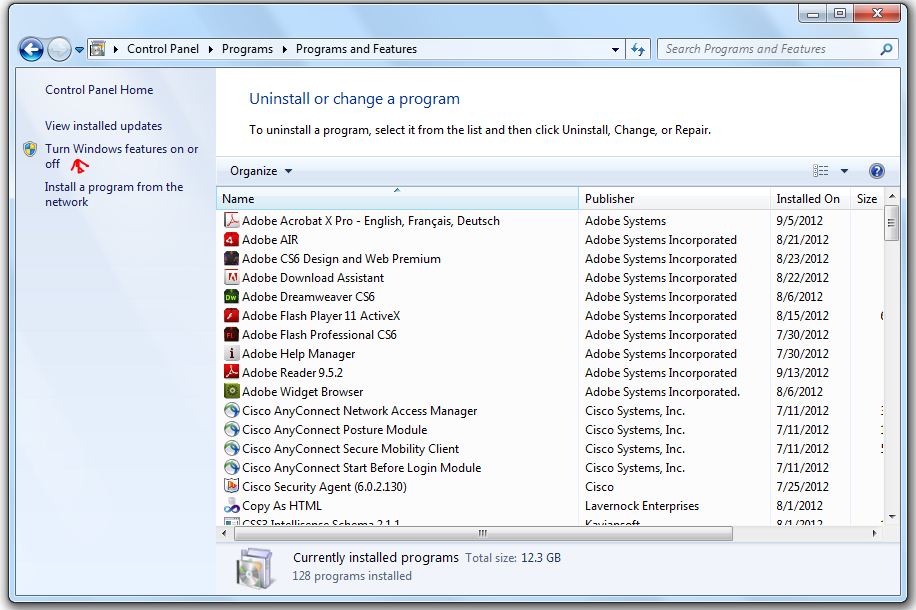
In Control Panel, click Programs and then click Turn Windows features on or off.


In the Windows Features dialog box, check Internet Information Services and then click OK.


2. Create a Website / Web Application or Download Sample

You may create your own website or download the sample from the following URL

http://www.risingperfection.com/demo/apps/fb/FileBox.zip

Download the sample web application - FileBox, from the below url.   FileBox is a single page simple web application written on ASP.NET C# to upload photos. You may write your own applications or static HTML web pages as well.

3. Host Website to the IIS Root Directory

Open the following folder location and delete all files and folders inside.
C:\inetpub\wwwroot\

Unzip all the files and folders in FileBox to the IIS root folder.
C:\inetpub\wwwroot\


4. Configure IP Address for Your Machine

Now you need to assign an IP address to your machine, if it doesn't exists already.

First, let's check whether you are connected to the LAN network. You may check that in various ways. But the simple way is to ping your switch or router IP address. Usually, but not necessarily, it would be 192.168.1.1. To ping and test open the start menu and type ping 192.168.1.1 -t (replace the ip with your switch or router ip). You must be able to get response as follow:


If you get any other response then something is wrong with your network. You need to fix that first!
Note: Numerical values of bytes, time, TTL will change for every computer and networks

If the network is working well, check whether you have an IP address assigned. In the command prompt, type ipconfig -all and press enter. You will see information about the network ip addresses configured to your machine as below.


IPv4 Address is your local machine IP address. If you don't see screen like this, IP is not configured for your machine. You need to configure it manually by following steps below.

Assign IP Address Manually

Step 1: Go to Start menu and search for View Network Connections
or navigate to Control Panel\Network and Internet\Network and Sharing Center

Step 2: Click on Local Area Connection or Wireless Network


Step 3: Click Properties


Step 4: Select Internet Protocol Version 4 (TCP/IPv4) and Click Properties


Step 5: Select User Configured and enter your desired local IP address within the LAN IP range and click Ok to save and close all open windows.

Example / Typical Configuration:

IP Address: 192.168.1.2
Subnet Mask: 255.255.255.0
Default Gateway: 192.168.1.1

Preferred DNS: 8.8.8.8
Secondary DNS: 8.8.4.4


5. Test the Website

Test on Local Machine

First, let us test the website from the local machine. Open your webbrowser and navigate to http://localhost/ or http://127.0.0.1/. You must be able to see the   FileBox homepage.

Test from a Remote Machine

You need another computer or a mobile phone or a tablet connected to the same LAN network to test our webpage. To test the page, open a web browser and navigate to http://<your machine ip address> (eg: http://192.168.1.2). You must be able to see the   FileBox homepage.

If it fails, you need to go through the steps 1 through 3 again or if you are not able to solve, post your problem in the comment section below to seek solution from me and peer readers.

Hint: If you buy a static IP from your ISP vendor and configure it you can access this website from internet. A static IP would typically cost you Rs.2000 ($40 approx) per year. Also note, this could be useful only for your personal use.


Hope this article would be useful to you. Please share your comments below.

Wednesday, June 06, 2012

Cyberwar - It is happening..


Check this infographic on How US - IRAN secret Cyberwar worked.

http://www.nytimes.com/interactive/2012/06/01/world/middleeast/how-a-secret-cyberwar-program-worked.html?ref=middleeast

After all, Information Technology shouldn't become one danger like Nuclear Technology.

It could, today most systems are computerized and interconnected with networks. Any damage happen will reflect the global economy as the networks expanded with internet.

Today is rebirth of internet protocol with IPV6 launch worldwide. Let's believe and promise we use technology for the good and betterment of humans. At least, definitely not for any destruction.

A Milestone for Internet: World IPv6 Launch Today (6th June 2012)


World IPv6 Launch Solidifies Global Support for New Internet Protocol

Top websites, Internet service providers, and home networking equipment manufacturers commit to largest transition in the Internet’s history.


Committed ISPs are:

  • AT&T
  • Comcast
  • Free Telecom
  • Internode
  • KDDI
  • Time Warner Cable
  • XS4ALL


Committed equipment manufacturers are:

  • Cisco
  • D-Link
Web companies participating in World IPv6 Launch will enable IPv6 on their main websites permanently beginning 6 June 2012. Inaugural participants are:
  • Facebook (www.facebook.com)
  • Google (www.google.com)
  • Microsoft Bing (www.bing.com)
  • Yahoo! (www.yahoo.com)
Content delivery network providers Akamai and Limelight will be enabling their customers to join this list of participating websites by enabling IPv6 throughout their infrastructure.

As IPv4 addresses become increasingly scarce, every segment of the industry must act quickly to accelerate full IPv6 adoption or risk increased costs and limited functionality online for Internet users everywhere. World IPv6 Launch participants are leading the way in this effort.

For more information about World IPv6 Launch, products, and services covered, as well as links to useful information for users and information about how other companies may participate, visit:


Sunday, April 29, 2012

How to install FTP on Windows Server 2008 R2


Step-by-Step Guide

  1. On the Windows Start menu, click Administrative Tools, and then click Server Manager.
  2. In the Server Manager Pane, in the Roles Summary section, click Web Server (IIS).
  3. In the Web Server (IIS) section, click Add Role Services.
  4. Under Role services, select FTP Publishing Service. This will install the FTP service and the FTP management console.
  5. Click Next, and then click Install.

    Now you may go to IIS Manager and add FTP Publishing to your existing website or you may create a new FTP Site pointing its root folder to the website root.

    Note: If your IIS Manager is already open, close the window and open again to see FTP option in the IIS Manager.

Wednesday, March 21, 2012

Utilizing Public CDN for common scripts like JQuery


Are you in a dilemma to use public CDN or go with self-hosting for common scripts?

Take a quick and bold decision to go with public CDN. Using Public CDN is the best way to provide optimal experience to web users.

Some people think Google like enterprises don’t maintain servers as we do! Some time they are proven to be rite!!

Best practice to use Public CDN for common scripts
  1. Always use minified version on production
  2. First pull your script from the CDN
  3. Check for the script availability
  4. If script download fail, load script from your host
Example implementation:

Google CDN

<script
src="
http://ajax.googleapis.com/ajax/libs/jquery/1.7.1/jquery.min.js" >  < /script>

<script >  
!window.jQuery && document.write(' < script src="js/jquery-1.7.1.min.js" > < \/script > ')
</script>

Other Popular Public CDN

MICROSOFT

JQUERY


Do you want know why? Want to know what's under the hood? Never settle, go ahead and dig deeper, I am of your kind..

Why? What is the benefit of using a public CDN?

To understand this you need to know the basics of Internet and Browsers.

Let’s start with internet connection standards defined on HTTP 1.1 specification by W3C.

Browsers limit the number connections to the same domain irrespective of no. of tabs opened. Following are some findings from the internet for maximum number of connection limits.

Firefox 2.x       : 2
Firefox 3.x       : 6
IE 6/7               : 2
IE 8                  : 2 on dialup,
IE 8                  : 6 on broadband
Chrome            : 2
Safari               : 2
Opera 9.x         : 4
This is as per the HTTP 1.1 specification (which is currently live on 20th March, 2012) in the RFC 2616 Section 8 (Connections) under 8.1.4 (Practical Considerations) in the last paragraph.
Clients that use persistent connections SHOULD limit the number of simultaneous connections that they maintain to a given server. A single-user client SHOULD NOT maintain more than 2 connections with any server or proxy. A proxy SHOULD use up to 2*N connections to another server or proxy, where N is the number of simultaneously active users. These guidelines are intended to improve HTTP response times and avoid congestion.
So when you load a page, browsers make only specified no. of concurrent connections to the server to pull resources. So serving static content from different domain origin will save your domain quota on same domain origin. I’ll explain more on improving performance in a separate post.

The next big advantage of using public CDN is from the Browser behaviour / feature. Most browsers support strong cache mechanism to optimize network usage and improve user experience.

Caching is a mechanism to capture and store the recent or most commonly accessed static content in a small storage space. The storage space mentioned here is a browser cache in the client machine. It could probably be a temporary internet folder.

For example if an image or script file is downloaded from the internet it is preserved in a temporary internet folder with its origin for a span of time. The span could be determined by the headers. Defining headers go beyond the scope of this topic so we’ll discuss it in a different post. So when next time the same file is requested, it is available to the browser from the local machine cache instead of downloading from the server.

Assume, the user visited a site, say SiteA which use public CDN for JQuery script file. Now the user visits your site and we assume you use the same CDN for JQuery script file as the SiteA used. This time the JQuery will be available to the user from his local machine cache and it is instant. This makes your site work faster.

Let’s go back to Advantage of Internet. It is on CDN technology. CDN is an abbreviation for Content Delivery Network. You can treat this like a server backed by many number of servers from geographically diverse locations. When you seek a resource the server helps to serve it from the geographically closest server. For the any file copied to the host server will be replicated to servers inside the provider CDN all over the world. Basically if time of travel reduces speed of delivery increases.

Leading Through Good Times


It is all about being  responsible and understanding simple objectives

Career is almost a half part of an individual's life. For many it is the most part of life. Keeping work and life balanced is a thought at the age of 35 and above at the time where you missed all your valuable ages of life.

I use to have monthly feedback meeting where I allow my sub-ordinates to complain on me! or I can say a feedback meeting. Initially it started with most complaints and over a period they stopped complaining. They appreciate very rarely! But do it from their heart which is the best compensation I enjoy for my hardwork.

I always believe, the sign boards and branding are not the company but the people and stake holders are. As a manager, I trust my responsibility is to keep my stake holders happy and satisfy their requirements. I understand I am a representative of the organization. My stake holders are people who I work for and with who I work. Essentially, my customers, my sub-ordinates and finally my managers.

I am valued because my customers are happy for which my sub-ordinates help me to keep them happy. So I need to give first priority for my customers followed my team. My managers wish the same order so the ecosystem is balanced and focused towards the common business objective of keeping customers happy.


Stop blame game and work as a team

I strongly believe mistakes made by team member is mine.

Absolutely, there is nothing to blame, nothing to harm. After all it is a team work. Mistakes can be taken for discussion to identify the root cause and solutions could be discussed to avoid such mistakes in future.

I found some leads point out mistakes in a way it harm the developers. It leads to depression for the developer and frustration for both. It also makes the developer feel inferior.

If the developer don't write the code well, it is the mistake of the person who hired the developer or the one who trained him or even it could be because of the SDLC practice. Don't you agree?

Most leads and managers forget their role in a team. Being a good team player he should identify the strength and weakness of every resource and make the resource a valuable asset to the organization. It is also every manager's responsibility to mentor the sub-ordinates. Their career/life is trusted on organization which in turn handed over to a responsible manager or lead.

Reminding how many mistakes we did and never took efforts to correct them. Jumping companies and being promoted as managers! Ha, after all is it not true? Even if not for you, you accept this truth with your known circle. But I'll say it is nothing wrong. Everybody does mistakes. It is about accepting them and correcting it with the right spirit. In fact man who does many mistakes could be a better manager.

A senior programmer's single page of code could have dozens of bugs. It lies on the perspective and application. Sometime, following best practices doesn't work all the times for all the applications. It isn't just my statement but the best practices itself. It says best practice for most applications but not all.

Treat mistakes as learning milestones and not as crime. Document mistakes and prepare a best practice manual for your organization.

I agree, mistakes costs. It has to be budgeted. Even if it is unacceptable, it is practical. Sometime, it is called as buffer time!

Never do it

I have noticed leads and project managers writing code sitting next to developers and keep in sync with development process. While it is appreciable for a manager to contribute code, it is offense to ignore the responsibilities of a lead or manager.

It will speed up development but extends time of the project. Contradicting? Yes, most of your time should be spent on code reviewing and to comply with objectives and milestones. Find places to improve, identify re-usable code, help developers to be more efficient and organized, define metrics, tabulate resource utilization and identify ways to maximize of productivity, arrange for performance meetings, arrange for technical training, work closely with testing teams and development teams, work closely with business team and customers. I promise you, you won't be finding time to sit on a developer desk.

If you deny doing the above, basically you have problem with your team. Be bold to rebuild your team. A good craft man requires good tools. Here tools include resources/brains too. It is a business call. Try to help people get on-board with required skills, if it is not affordable let the team understands it. Have a open meeting. Investing on good brains are important than investing on infrastructure and assets when your business is majorly run on brains.


Managerial roles are commonly circled as Projects, Business, Human Resource, Marketing. Finance and Operations. Understanding the circle is very important and being effective inside the circle helps the organization more than trying to penetrate in to next. The top level management helps coordinating inter-circles.

These points are out of my experiences. I would be happy to discuss it with your comments.